Select by Frequency
This option allows the user to select bills based on their Billing Frequency. The Billing Frequency is determined at the Matter Level for fees and expenses and may be set to: Monthly, Quarterly, Semiannually, Annually or On Cycle. Select By Frequency ignores the Matters that use On Cycle option (the On Cycle matters will have to be selected using the Select By Cycle” option). Matters set to Quarterly, Semiannual, or Annual frequency will also require that a billing period (Billing Month) be set.
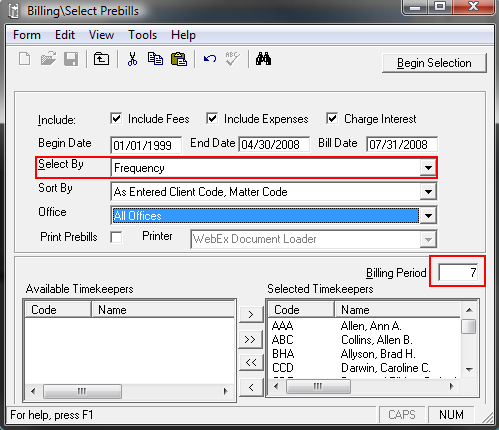
When Select By Frequency is used, all matters set to Monthly will be selected as well as any Quarterly, Semiannual, or Annual matters whose Billing Month on the matter level matches the Billing Period chosen in Select Prebills. By default, all Timekeepers will be included in the selection; however, the user may choose to further restrict the selection criteria by choosing to include particular Timekeepers in the selection at the exclusion of any matter using a Billing Timekeeper not on the Selected Timekeeper’s list.
To include a Timekeeper in the selection, simply click on that Timekeeper
on the left side of the screen and then click the right arrow  to
add that Timekeeper to the list on the right. To
remove a Timekeeper from the selection, click on that Timekeeper on the
right side of the screen and then click the left arrow to
remove that Timekeeper from the list of selected Timekeepers and place
it back on the list of available Timekeepers. The
double arrow keys
to
add that Timekeeper to the list on the right. To
remove a Timekeeper from the selection, click on that Timekeeper on the
right side of the screen and then click the left arrow to
remove that Timekeeper from the list of selected Timekeepers and place
it back on the list of available Timekeepers. The
double arrow keys 
 will
move all Timekeepers to one list. The
double arrow pointing right will add all Timekeepers
to the Selected Timekeepers list. The
double arrow pointing left will move all fields to the AvailableTimekeepers list.
will
move all Timekeepers to one list. The
double arrow pointing right will add all Timekeepers
to the Selected Timekeepers list. The
double arrow pointing left will move all fields to the AvailableTimekeepers list.
The Timekeeper who is in day-to-day charge of a Client or Matter. Typically the billing Timekeeper would be responsible for all transactions for that Client or Matter, including Trust Account responsibility.